
Save Hours Of Work Every Week!
Learn how to automate, organize, and simplify your Appfolio bookkeeping tasks with our free guide!


What Is RUBS? How to Set Up Ratio Utility Billing in AppFolio
Monday, November 23, 2026
Utility costs are quietly eating your NOI
If the owner pays the water, sewer, trash, or electric bill on a multifamily property and none of it is passed through, every rate increase comes straight out of net operating income. Sub-metering fixes that, but it's expensive and often impractical in older buildings.
That's where a Ratio Utility Billing System (RUBS) comes in. AppFolio has RUBS built in, and when it's set up correctly it automates tenant utility charges every time you enter a bill.
What is RUBS?
RUBS is a method of dividing a property's utility bill among residents using a formula instead of individual meters. In AppFolio, the tenant share can be based on:
• Number of occupants in each unit, and/or
• Square footage of each unit.
The owner covers a set percentage (typically common-area usage), and the rest is allocated to tenants. AppFolio then generates the tenant charges for you.
Note: in AppFolio, RUBS is available for all property types except single-family residences.
First, confirm you're allowed to bill utilities
Utility billing rules vary by state, county, and city. Before turning anything on, confirm tenant billing is permitted where the property is located. Good places to check:
• Your state's Public Utility Commission
• Your local Department of Real Estate (DRE)
• Your local apartment association
If the owner pays the utilities and tenant billing is allowed, you should be eligible to use RUBS. Also make sure your lease language supports the charges.Lorem ipsum dolor sit amet, consectetur adipisicing elit. Autem dolore, alias, numquam enim ab voluptate id quam harum ducimus cupiditate similique quisquam et deserunt, recusandae.
Before you start: three things to have ready
| What you need | Why it matters |
|---|---|
| Presidential user access | Only a Presidential user can activate the RUBS feature. |
| Two GL accounts per utility type: an expense account (for the vendor bill) and an income account (for the tenant charge) | AppFolio books the bill to expense and the tenant charges to income. Existing utility GL accounts can be reused. |
| Utility companies set up as vendors | Each allocation is tied to the vendor that provides the service. Existing vendors can be reused. |
Getting the GL structure right here is what makes your owner statements readable later. Mixing RUBS income with other fee income makes it hard for owners to see how much utility cost is actually being recovered.
How to set up RUBS in AppFolio, step by step
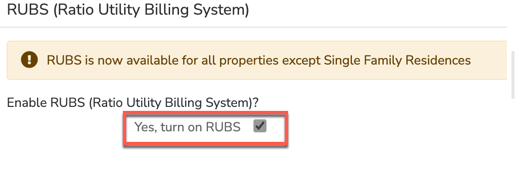
Step 1: Turn on RUBS company-wide
1. Click your name in the top right of any AppFolio page and select General Settings.
2. Click Manage Accounting Settings.
3. Scroll to the RUBS (Ratio Utility Billing System) block and check Yes, turn on RUBS.
Step 2: Add utility allocations on each property
1. Open the property page and scroll to the Utility Billing (RUBS) section. You'll see a warning that no units are enabled yet; that's expected.
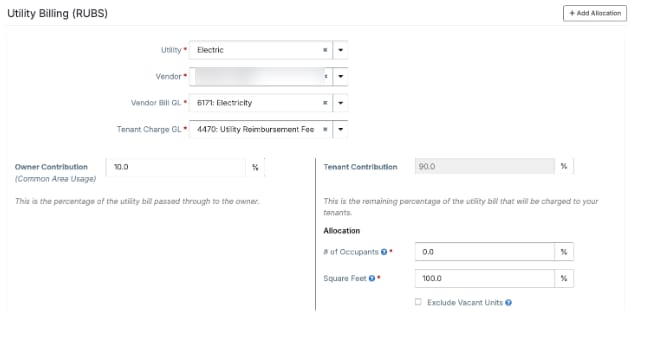
2. Click Add Allocation and fill in:
◦ Utility: the utility type (e.g., Electric, Water).
◦ Vendor: the company that provides the service.
◦ Vendor Bill GL: the expense account for this utility.
◦ Tenant Charge GL: the income account for this utility.
◦ Owner Contribution %: the share the owner always covers (typically common-area usage). This is the owner's minimum share when every unit is occupied all month. Vacancy shifts more of the bill to the owner.
◦ Tenant Contribution %: calculated automatically as the remainder.
◦ Tenant Allocation: how the tenant share is split, by # of Occupants and/or Square Feet. For the square-footage portion, you can check Exclude Vacant Units so it's only allocated to units while occupied.
3. Click Save. Repeat for every utility on every RUBS property.
Are you struggling with unreconciled accounts, messy reports, confusing AppFolio errors and not time to fix them?
Book a free consultation today and see how our Team can save you hours each week and eliminate the guesswork.
Step 3: Enable RUBS on each eligible unit
Before you start, audit each unit's occupant count and square footage. RUBS charges are only as accurate as this data.
1. Open the unit page (the unit must belong to a property set up for RUBS).
2. In Unit Information, click Edit.
3. Check Utility Billing (RUBS) Enabled and set the RUBS Enabled On date.
4. Click Save.
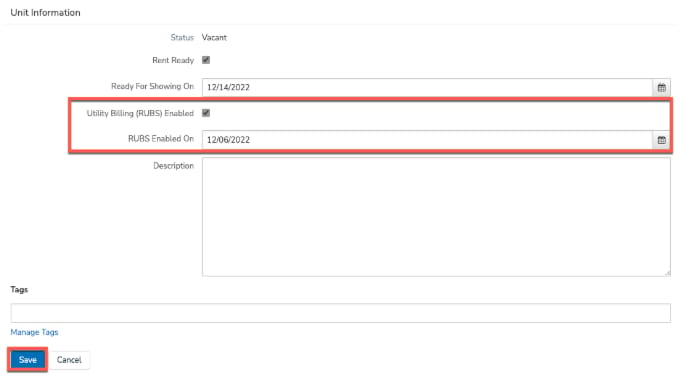
The enabled date matters. If you enter a bill whose consumption period starts before a unit's enabled date, that unit's charges won't calculate correctly. To check status across your portfolio, run the Unit Directory report and add the Utility Billing (RUBS) Enabled and Utility Billing Start On columns.
Step 4: Start entering utility bills
From here, you enter utility bills for RUBS and AppFolio calculates tenant charges based on your allocations. If a bill is entered wrong, AppFolio supports reversing a RUBS utility bill rather than editing charges by hand.
A simple RUBS exampleA simple RUBS example
A simplified, illustrative example: a 3-unit building gets a $1,000 water bill. The owner contribution is set at 10% (common areas), so $900 goes to tenants, allocated 100% by square footage, with all units occupied the full month.
| Unit | Square feet | Share of total | Tenant charge |
|---|---|---|---|
| A | 800 | 26.7% | $240 |
| B | 1,000 | 33.3% | $300 |
| C | 1,200 | 40.0% | $360 |
| Total | 3,000 | 100% | $900 |
The owner pays $100. If Unit C sat vacant half the month, part of its share would shift to the owner. AppFolio's own calculation formula handles proration in detail; this example is just to show the logic.
Common RUBS mistakes we see
• Wrong occupant counts or square footage. Bad unit data means every charge is wrong, and tenants notice.
• Enabled dates set after the bill's service period. Charges for that unit won't calculate correctly.
• One generic income account for all utilities. Owners can't see recovery by utility type.
• Skipping the legal check. Billing where it's not allowed creates refund and compliance exposure.
• Not reviewing owner contribution after vacancy spikes. Owners can be surprised when their share jumps.
Frequently Asked Questions
What does RUBS stand for?
Ratio Utility Billing System: a way to split a master-metered utility bill among tenants using a formula.
Can I use RUBS on single-family homes in AppFolio?
No. AppFolio makes RUBS available for all properties except single-family residences.
Who can turn on RUBS in AppFolio?
A Presidential user must activate the feature in General Settings.
Do I need new GL accounts?
You need one expense and one income GL account per utility type. Existing accounts work if you already have them.
Is RUBS legal everywhere?
No. Rules vary by state, county, and city. Check with your Public Utility Commission, DRE, or apartment association first.
What Is RUBS? How to Set Up Ratio Utility Billing in AppFolio
Monday, November 23, 2026
Utility costs are quietly eating your NOI
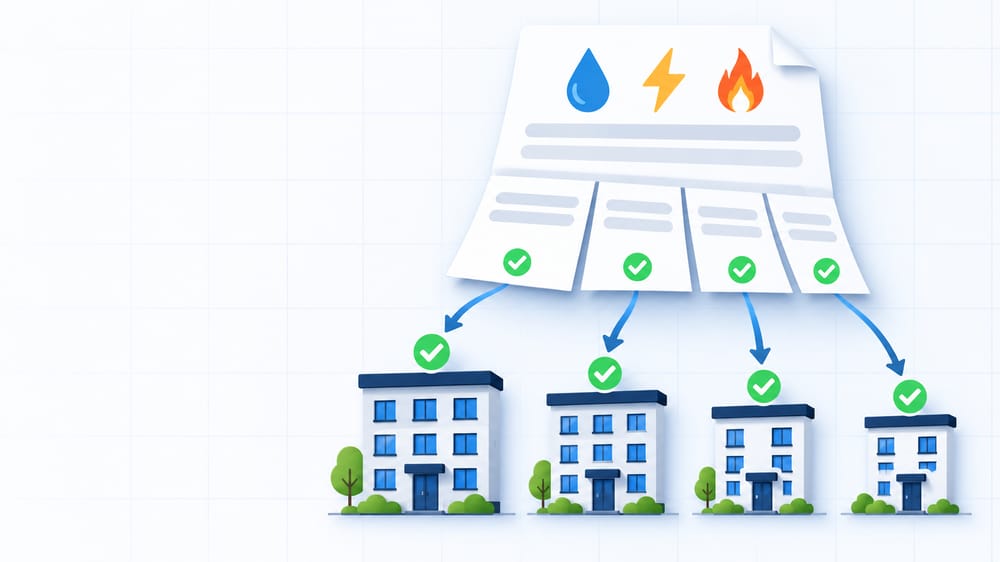
If the owner pays the water, sewer, trash, or electric bill on a multifamily property and none of it is passed through, every rate increase comes straight out of net operating income. Sub-metering fixes that, but it's expensive and often impractical in older buildings.
That's where a Ratio Utility Billing System (RUBS) comes in. AppFolio has RUBS built in, and when it's set up correctly it automates tenant utility charges every time you enter a bill.
What is RUBS?
RUBS is a method of dividing a property's utility bill among residents using a formula instead of individual meters. In AppFolio, the tenant share can be based on:
• Number of occupants in each unit, and/or
• Square footage of each unit.
The owner covers a set percentage (typically common-area usage), and the rest is allocated to tenants. AppFolio then generates the tenant charges for you.
Note: in AppFolio, RUBS is available for all property types except single-family residences.
First, confirm you're allowed to bill utilities
Utility billing rules vary by state, county, and city. Before turning anything on, confirm tenant billing is permitted where the property is located. Good places to check:
• Your state's Public Utility Commission
• Your local Department of Real Estate (DRE)
• Your local apartment association
If the owner pays the utilities and tenant billing is allowed, you should be eligible to use RUBS. Also make sure your lease language supports the charges.Lorem ipsum dolor sit amet, consectetur adipisicing elit. Autem dolore, alias, numquam enim ab voluptate id quam harum ducimus cupiditate similique quisquam et deserunt, recusandae.
Before you start: three things to have ready
| What you need | Why it matters |
|---|---|
| Presidential user access | Only a Presidential user can activate the RUBS feature. |
| Two GL accounts per utility type: an expense account (for the vendor bill) and an income account (for the tenant charge) | AppFolio books the bill to expense and the tenant charges to income. Existing utility GL accounts can be reused. |
| Utility companies set up as vendors | Each allocation is tied to the vendor that provides the service. Existing vendors can be reused. |
Getting the GL structure right here is what makes your owner statements readable later. Mixing RUBS income with other fee income makes it hard for owners to see how much utility cost is actually being recovered.
How to set up RUBS in AppFolio, step by step
Step 1: Turn on RUBS company-wide
1. Click your name in the top right of any AppFolio page and select General Settings.
2. Click Manage Accounting Settings.
3. Scroll to the RUBS (Ratio Utility Billing System) block and check Yes, turn on RUBS.
Step 2: Add utility allocations on each property
1. Open the property page and scroll to the Utility Billing (RUBS) section. You'll see a warning that no units are enabled yet; that's expected.
2. Click Add Allocation and fill in:
◦ Utility: the utility type (e.g., Electric, Water).
◦ Vendor: the company that provides the service.
◦ Vendor Bill GL: the expense account for this utility.
◦ Tenant Charge GL: the income account for this utility.
◦ Owner Contribution %: the share the owner always covers (typically common-area usage). This is the owner's minimum share when every unit is occupied all month. Vacancy shifts more of the bill to the owner.
◦ Tenant Contribution %: calculated automatically as the remainder.
◦ Tenant Allocation: how the tenant share is split, by # of Occupants and/or Square Feet. For the square-footage portion, you can check Exclude Vacant Units so it's only allocated to units while occupied.
3. Click Save. Repeat for every utility on every RUBS property.
Are you struggling with unreconciled accounts, messy reports, confusing AppFolio errors and not time to fix them?
Book a free consultation today and see how our Team can save you hours each week and eliminate the guesswork.
Step 3: Enable RUBS on each eligible unit
Before you start, audit each unit's occupant count and square footage. RUBS charges are only as accurate as this data.
1. Open the unit page (the unit must belong to a property set up for RUBS).
2. In Unit Information, click Edit.
3. Check Utility Billing (RUBS) Enabled and set the RUBS Enabled On date.
4. Click Save.
The enabled date matters. If you enter a bill whose consumption period starts before a unit's enabled date, that unit's charges won't calculate correctly. To check status across your portfolio, run the Unit Directory report and add the Utility Billing (RUBS) Enabled and Utility Billing Start On columns.
Step 4: Start entering utility bills
From here, you enter utility bills for RUBS and AppFolio calculates tenant charges based on your allocations. If a bill is entered wrong, AppFolio supports reversing a RUBS utility bill rather than editing charges by hand.
A simple RUBS exampleA simple RUBS example
A simplified, illustrative example: a 3-unit building gets a $1,000 water bill. The owner contribution is set at 10% (common areas), so $900 goes to tenants, allocated 100% by square footage, with all units occupied the full month.
| Unit | Square feet | Share of total | Tenant charge |
|---|---|---|---|
| A | 800 | 26.7% | $240 |
| B | 1,000 | 33.3% | $300 |
| C | 1,200 | 40.0% | $360 |
| Total | 3,000 | 100% | $900 |
The owner pays $100. If Unit C sat vacant half the month, part of its share would shift to the owner. AppFolio's own calculation formula handles proration in detail; this example is just to show the logic.
Common RUBS mistakes we see
• Wrong occupant counts or square footage. Bad unit data means every charge is wrong, and tenants notice.
• Enabled dates set after the bill's service period. Charges for that unit won't calculate correctly.
• One generic income account for all utilities. Owners can't see recovery by utility type.
• Skipping the legal check. Billing where it's not allowed creates refund and compliance exposure.
• Not reviewing owner contribution after vacancy spikes. Owners can be surprised when their share jumps.
Frequently Asked Questions
What does RUBS stand for?
Ratio Utility Billing System: a way to split a master-metered utility bill among tenants using a formula.
Can I use RUBS on single-family homes in AppFolio?
No. AppFolio makes RUBS available for all properties except single-family residences.
Who can turn on RUBS in AppFolio?
A Presidential user must activate the feature in General Settings.
Do I need new GL accounts?
You need one expense and one income GL account per utility type. Existing accounts work if you already have them.
Is RUBS legal everywhere?
No. Rules vary by state, county, and city. Check with your Public Utility Commission, DRE, or apartment association first.
Are you a property manager looking to grow your business?
Learn How To Free yourself from stressful Appfolio Bookkeeping tasks, and gain back your time to focus on growth
Get free access to 14 actionable tips to help you speed up your bookkeeping processes, reduce errors, and save valuable time.
A FREE PDF Guide crafted by our team of experienced Appfolio bookkeepers to help property managers overcome the hardest and most time-consuming bookkeeping tasks.


Contact us
info@appfoliobookkeeping.com
Cloud5 Accounting
10476 N. Haymaker Ln, Highland, Utah 84003
2025 all rights reserved